Platform navigation
Tour of all major platform sections including the sidebar, search, and breadcrumbs so you can navigate VerifyWise with confidence.
Overview
VerifyWise organizes AI governance activities into distinct sections, each focused on a specific aspect of your program. This guide walks through the main areas of the platform and explains what you will find in each one.
The sidebar on the left provides access to all major sections. As you work through your governance program, you will move between these areas depending on what you need to accomplish.
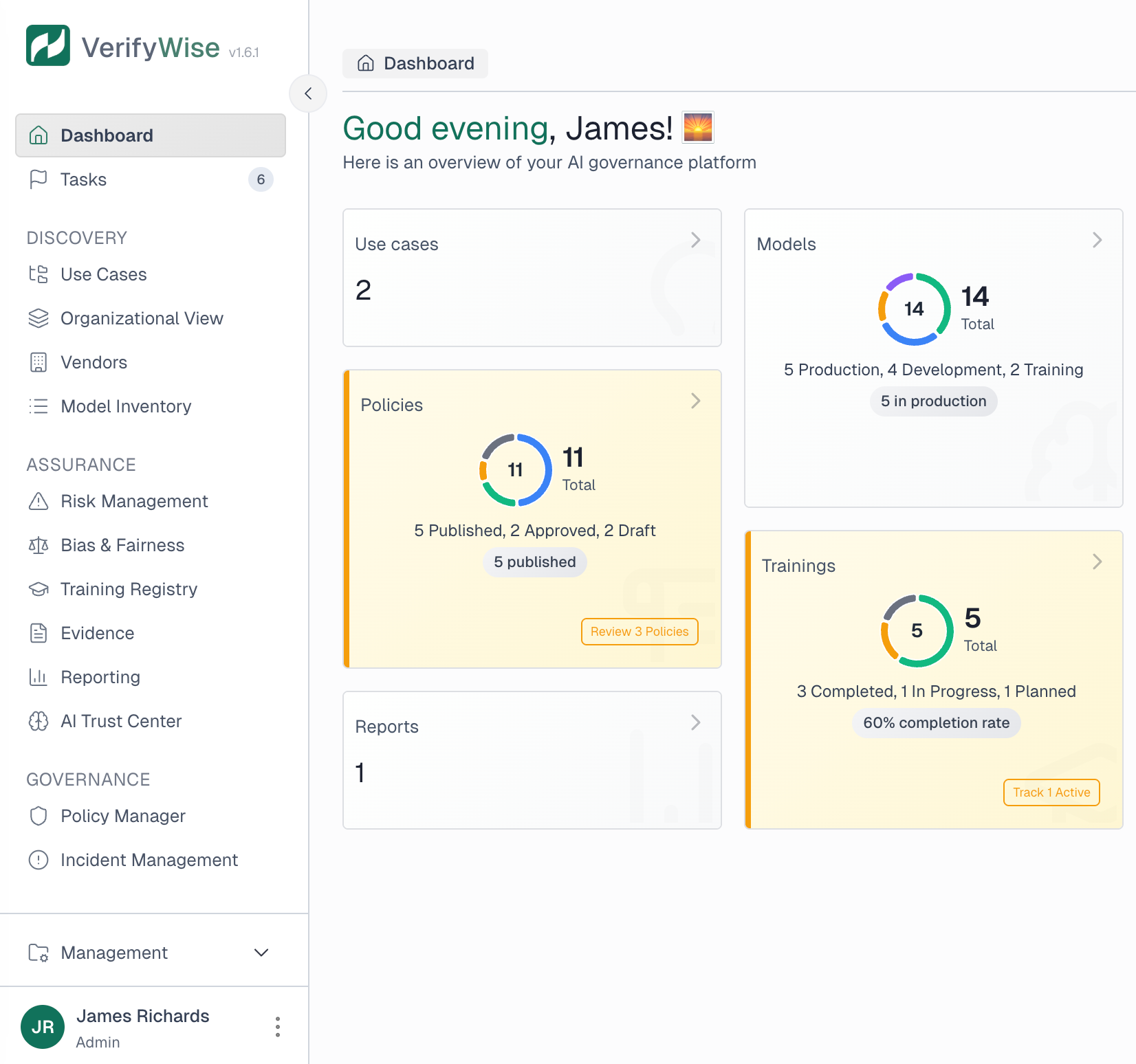
Home dashboard
The Home dashboard is your starting point. It provides a summary view of your governance program with key metrics and recent activity. You will see compliance progress, open tasks, risk summaries, and quick access to items that need attention.
The dashboard is customizable. You can rearrange widgets, show or hide sections, and configure what appears based on your role and priorities. Changes you make persist across sessions.
- Compliance progress: Visual indicators showing how complete your framework implementations are
- Risk overview: Summary of open risks by severity level
- Recent activity: Latest changes across your governance program
- Tasks: Items assigned to you or your team that need action
Projects
Projects are the primary organizational unit in VerifyWise. A project groups related AI systems, risks, controls, and compliance activities together. Most organizations create one project per AI initiative, product, or business unit.
Within a project, you will find:
- Overview: Project summary with key metrics and status
- Use cases: Specific applications of AI within this project
- Risks: Identified risks associated with the project
- Controls: Measures implemented to manage risks
- Assessments: Compliance evaluations and their results
Model inventory
The Model Inventory is your catalog of AI models. Every model your organization develops, deploys, or uses from third parties should be registered here. The inventory tracks model details, ownership, deployment status, and risk classification.
From the Model Inventory, you can:
- Register new models with complete metadata
- Track model versions and changes over time
- Associate models with vendors and use cases
- View risk classifications and compliance status
- Filter and search across your model portfolio
Risk management
The Risk Management section contains tools for identifying, assessing, and tracking risks across your AI systems. You will find both project-specific risks and organization-wide risk views.
Key capabilities include:
- Risk register: Complete list of identified risks with severity, likelihood, and status
- Risk assessments: Structured evaluations of risk factors
- Mitigation tracking: Monitor progress on risk reduction activities
- Risk linking: Connect risks to specific models, vendors, or controls
Vendors
The Vendor section tracks third-party providers of AI services, models, data, or infrastructure. Each vendor record includes contact information, service descriptions, risk scores, and review status.
Vendor management helps you:
- Maintain visibility: Know who provides what across your AI portfolio
- Assess vendor risk: Score vendors based on data sensitivity, criticality, and past issues
- Track reviews: Schedule and document periodic vendor assessments
- Link dependencies: Understand which projects rely on which vendors
Policies
The Policy Manager houses your AI governance policies. You can create policies from scratch, use templates, and manage the full policy lifecycle from draft through publication and eventual retirement.
Policies progress through defined states:
Draft
Policy is being written or revised.
In review
Policy is under stakeholder review.
Published
Policy is active and in effect.
Archived
Policy is no longer active.
Compliance frameworks
The Compliance section provides structured views of regulatory and standard requirements. VerifyWise supports multiple frameworks including EU AI Act, ISO 42001, ISO 27001, and NIST AI RMF.
For each framework, you can:
- View requirements: See all controls and requirements organized by category
- Track compliance: Monitor which requirements are addressed
- Map controls: Link your existing controls to framework requirements
- Generate reports: Create compliance summaries for auditors
Evidence hub
The Evidence Hub is a centralized repository for compliance documentation. Upload files, attach them to specific controls or requirements, and maintain an organized audit trail.
Evidence can include:
- Policy documents and approvals
- Risk assessment reports
- Testing results and validation records
- Training completion certificates
- Vendor due diligence documentation
- Audit findings and remediation records
Incidents
The Incident Management section tracks AI-related issues, failures, and near-misses. When something goes wrong with an AI system, create an incident record to document what happened, how it was resolved, and what was learned.
Each incident record captures:
- Description: What happened and when
- Severity: Impact level of the incident
- Affected systems: Which models or use cases were involved
- Resolution: How the issue was addressed
- Lessons learned: Improvements to prevent recurrence
Reports
The Reporting section generates summaries of your governance program. You can create project-level reports for specific initiatives or organization-wide reports that span your entire AI portfolio.
Reports are useful for:
- Board and executive presentations
- Regulatory submissions
- Audit preparation
- Periodic governance reviews
Settings
The Settings area contains configuration options for your organization and user account. Here you can:
- Organization settings: Update organization name and branding
- User management: Invite team members and manage accounts
- Role configuration: Assign Admin, Editor, or Viewer roles
- Notifications: Configure how you receive alerts
- API keys: Manage programmatic access credentials
- Integrations: Connect to external tools like Slack
Event tracker
The Event Tracker provides an audit log of actions taken within VerifyWise. You can see who changed what and when, which is essential for compliance and troubleshooting.
Events are filterable by user, action type, and date range. This makes it easy to investigate specific activities or review changes during a particular period.
AI Trust Center
The AI Trust Center is your public-facing transparency portal. Configure what governance information to share externally, then publish a page that customers, partners, and regulators can access.
The Trust Center helps demonstrate your commitment to responsible AI without exposing sensitive internal details.
Getting around quickly
A few shortcuts to help you navigate efficiently:
- Global search: Press Cmd+K (Mac) or Ctrl+K (Windows) to search across the entire platform
- Breadcrumbs: Use the breadcrumb trail at the top to move up the hierarchy
- Recent items: The dashboard shows your recent activity for quick access
- Sidebar collapse: Collapse the sidebar to gain screen space when needed