Managing model inventory
Register and track all AI models across your organization.
Overview
The model inventory is where you register every AI model your organization uses, whether it's a third-party API, an open-source model you host, or something built in-house. Each model gets an approval status, an owner, and a record of changes over time.
The point is visibility. If you can't answer basic questions (what AI do we run? who owns it? what data does it touch? is it approved?) then you can't govern it. The inventory gives you that baseline.
Why bother?
- Regulatory requirement: The EU AI Act (Article 60) and ISO 42001 both require documented records of AI systems in use, especially high-risk ones
- Risk visibility: You can't assess risks for models you don't know about. The inventory surfaces everything for review.
- Accountability: Every model has an owner. When something goes wrong, there's a clear person responsible.
- Audit readiness: Auditors ask "show me all your AI systems." With an inventory, you can answer in seconds instead of weeks.
Accessing the model inventory
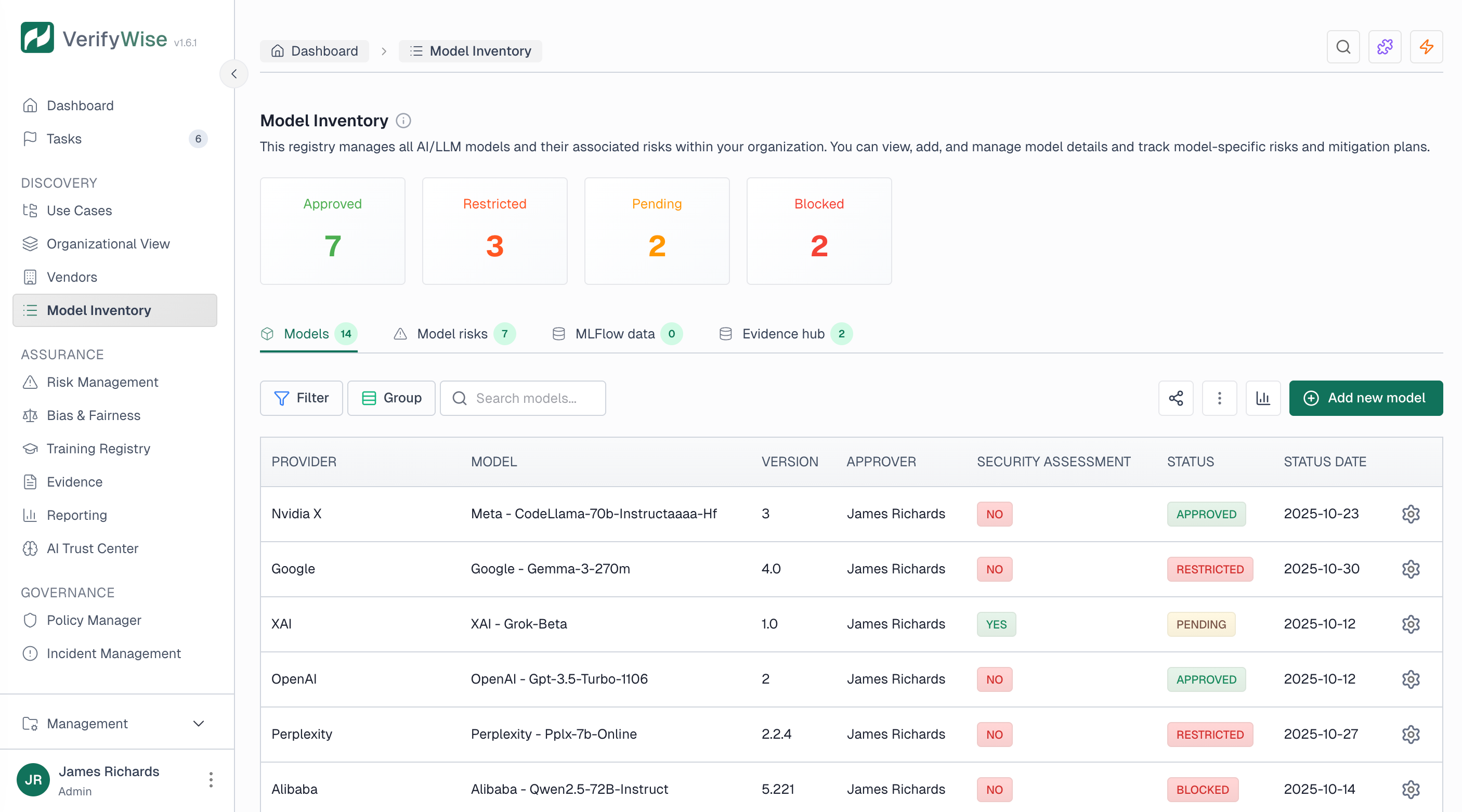
Open Model inventory from the sidebar (under Inventory). You get a table of all registered models with search, filters for status and provider, and summary cards showing counts by approval status at the top.
Registering a new model
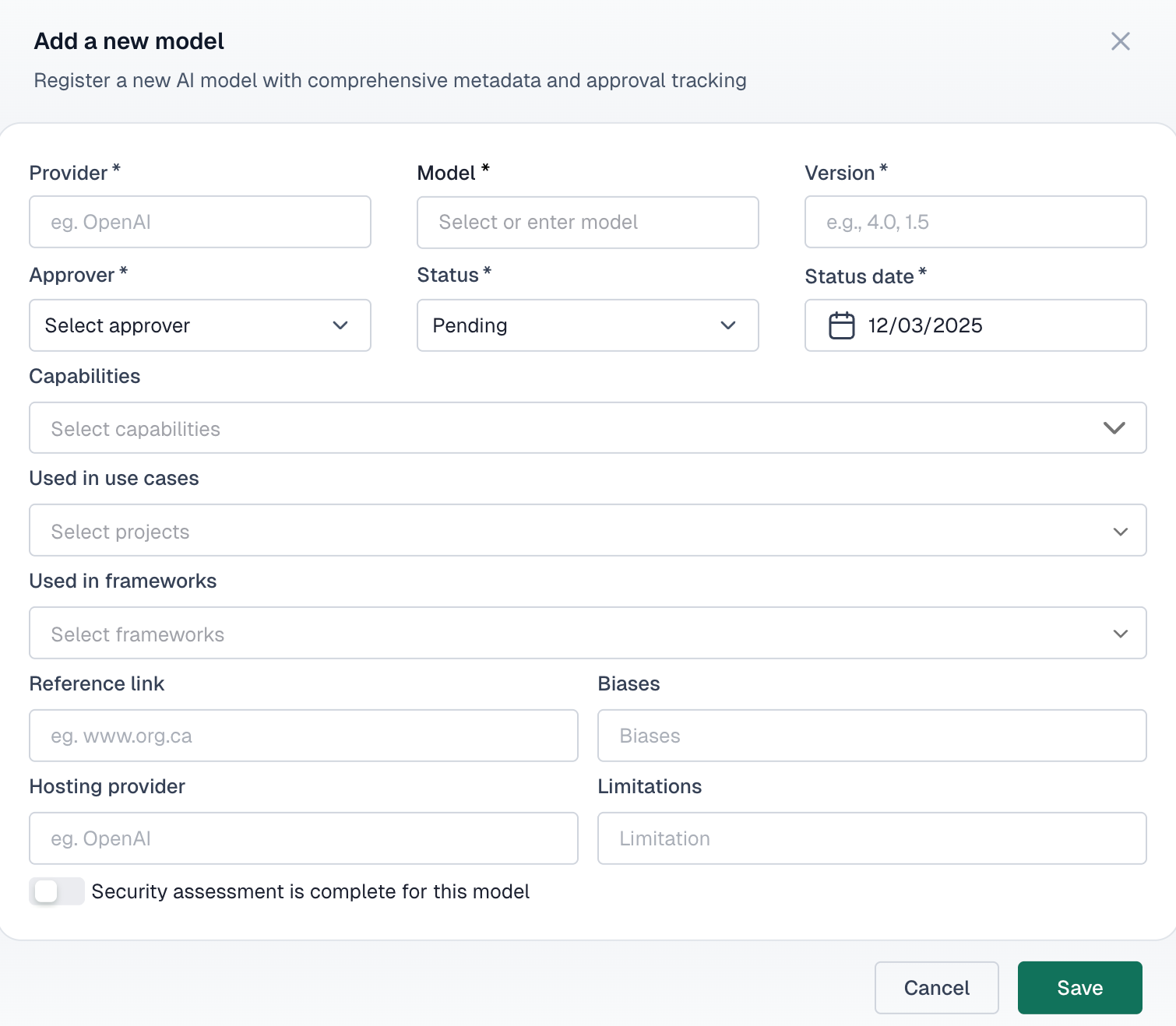
To add a new AI model to your inventory, click the Add model button and provide the required information:
- Provider: — The organization or service that provides the model (e.g., OpenAI, Anthropic, internal team)
- Model name: — The specific model identifier (e.g., GPT-4, Claude 3, custom-classifier-v2)
- Version: — The version number or release identifier
- Approver: — The person responsible for approving this model for use
Model attributes
Beyond the basics, each model record supports these fields:
Capabilities
Document what the model can do — text generation, classification, image analysis, etc.
Known biases
Record any identified biases or fairness concerns with the model
Limitations
Document constraints and scenarios where the model should not be used
Hosting provider
Where the model is hosted — cloud provider, on-premises, or hybrid
Approval status
Every model in the inventory has an approval status that controls whether it can be used in your organization:
- Pending: Model is awaiting review and approval before use
- Approved: Model has been reviewed and authorized for production use
- Restricted: Model is approved for limited use cases or specific projects only
- Blocked: Model is not authorized for use in the organization
Security assessment
Models can be flagged as having completed a security assessment. When enabled, you can attach security assessment documentation directly to the model record for easy reference during audits.
Linking evidence
You can attach evidence files to any model record. Typical examples:
- Model cards and technical documentation
- Vendor contracts and data processing agreements
- Security assessment reports
- Bias testing results and fairness evaluations
- Performance benchmarks and validation studies
MLFlow integration
If you use MLflow, VerifyWise can pull in model training metadata directly: training timestamps, parameters, metrics and lifecycle stage. This saves you from manually entering data that your ML platform already has.
Once an Admin enables and configures the MLflow extension, an MLFlow tab appears in Model inventory. Click Sync there to pull the latest runs; syncing is manual. The Azure AI Foundry extension works the same way with its own Azure AI Foundry tab. See Extensions for setup.
Change history
VerifyWise automatically maintains a complete audit trail for every model in your inventory. Each change records:
- The field that was modified
- Previous and new values
- Who made the change
- When the change occurred
Auditors typically ask for this when reviewing how your organization tracks AI system changes over time.
Datasets
Datasets have their own page in the sidebar (Inventory → Datasets). You catalog the data used for training, validation, testing and production. Each dataset can be linked to models and use cases, so you can trace which data feeds which system.
Accessing datasets
Navigate to Datasets from the main sidebar under Inventory. The page shows all registered datasets in a searchable table with status summary cards at the top.
Adding a new dataset
To add a new dataset to your inventory, click the Add new dataset button and provide the required information:
- Name: — A descriptive name for the dataset
- Description: — Detailed explanation of what the dataset contains and its intended use
- Version: — The version identifier for tracking dataset iterations
- Owner: — The person or team responsible for maintaining the dataset
- Type: — The purpose of the dataset (training, validation, testing, production, or reference)
- Function: — The dataset's role in AI model development
- Source: — Where the data originated from
- Classification: — The sensitivity level of the data
- Status: — The current lifecycle stage of the dataset
- Status date: — When the current status was set
Dataset types
Datasets can be categorized by their purpose in the machine learning lifecycle:
- Training: Data used to train the model and learn patterns
- Validation: Data used to tune hyperparameters and prevent overfitting during training
- Testing: Data used to evaluate final model performance before deployment
- Production: Data that the deployed model processes in live environments
- Reference: Baseline or benchmark data used for comparison
Data classification
Each dataset should be classified according to its sensitivity level:
- Public: Data that can be freely shared without restrictions
- Internal: Data intended for use within the organization only
- Confidential: Sensitive data requiring access controls and handling procedures
- Restricted: Highly sensitive data with strict access limitations and regulatory requirements
Dataset status
Every dataset has a status indicating its current lifecycle stage:
- Draft: Dataset is being prepared or documented but not yet ready for use
- Active: Dataset is approved and currently in use for model development or production
- Deprecated: Dataset is no longer recommended for new use but may still be referenced by existing models
- Archived: Dataset is retained for historical purposes but not available for active use
Dataset attributes
Each dataset can include additional attributes to support governance and data quality:
Known biases
Document any identified biases in the data that could affect model outcomes
Bias mitigation
Record steps taken to identify, measure, and reduce bias in the dataset
Collection method
Describe how the data was gathered — surveys, scraping, APIs, manual entry, etc.
Preprocessing steps
Document transformations, cleaning, and normalization applied to the raw data
Linking datasets to models
When creating or editing a dataset, you can link it to one or more models in your inventory. This traceability matters when a data quality issue surfaces: you can immediately see which models are affected.
Linking datasets to use cases
In addition to models, datasets can be linked to specific use cases (projects) in your organization. This helps maintain a clear view of which data supports which business applications, supporting both governance oversight and impact analysis.
Optional fields
Beyond the required fields, you can document additional metadata to enhance governance:
- License: The licensing terms governing data use (e.g., CC BY 4.0, MIT, proprietary)
- Format: The data format (e.g., CSV, JSON, Parquet)
- PII types: Specific types of personally identifiable information when PII is present