Vendor risk assessment
Assess and track risks associated with your AI vendors.
Overview
Vendor risk assessment looks at the risks that come from relying on third-party providers for AI capabilities. When you use external AI services, models or platforms, you inherit risks from those relationships, and they're different from the risks of systems you build and control yourself.
Third-party AI creates dependencies that can affect your compliance, security and operations. A vendor security breach could expose your data. A vendor going out of business could disrupt your services. Changes to a vendor's model could alter your system's behavior in unexpected ways. You need to understand and manage these risks.
Why assess vendor risks?
Vendor risk assessment helps you:
- Maintain compliance: Under regulations like the EU AI Act, you remain responsible for AI systems even when using third-party components
- Protect sensitive data: Knowing what data flows to vendors helps you make better decisions about data sharing
- Plan for continuity: Spotting critical vendor dependencies helps you prepare contingency plans
- Prioritize oversight: Risk scores help you focus review efforts on the vendors that matter most
Scorecard dimensions
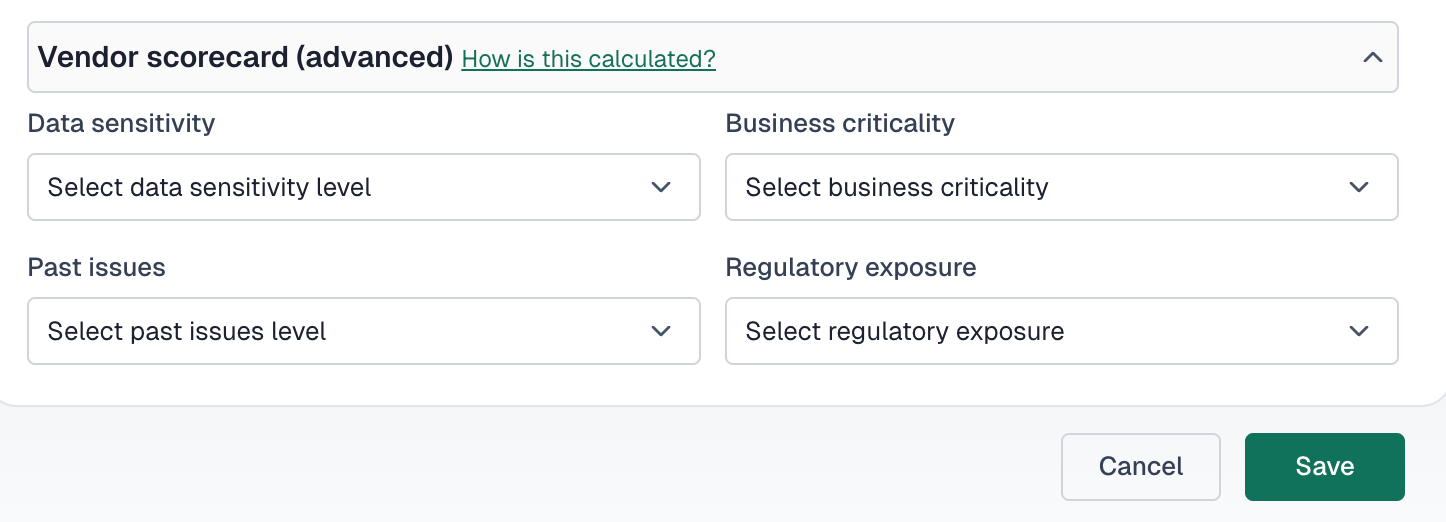
VerifyWise assesses vendor risk across four dimensions:
Data sensitivity
The sensitivity level of data shared with or processed by the vendor.
Business criticality
How critical the vendor is to your core business operations.
Past issues
Historical incidents or problems with this vendor relationship.
Regulatory exposure
Which regulations apply to this vendor relationship.
Assessing data sensitivity
Higher data sensitivity increases vendor risk. Classify the most sensitive data shared with the vendor:
- None: No sensitive data (lowest risk)
- Internal only: Internal business data
- Personally identifiable information (PII): Names, emails, identifiers and other personal data
- Financial data: Financial records, transactions or payment information
- Health data (e.g. HIPAA): Health and medical information subject to privacy regulation
- Model weights or AI assets: Proprietary model parameters or training data (highest risk)
Assessing business criticality
Evaluate how dependent your operations are on this vendor:
- Low (vendor supports non-core functions): Non-essential services; alternatives are readily available
- Medium (affects operations but is replaceable): Important but not critical; disruption would be manageable
- High (critical to core services or products): Disruption would significantly impact business
Consider these factors when assessing criticality:
- Number of projects depending on this vendor
- Availability of alternative vendors
- Time required to switch providers
- Revenue impact if vendor services are unavailable
Recording past issues
Document any historical incidents with the vendor to inform future risk decisions:
- None: No known issues (best)
- Minor incident (e.g. small delay, minor bug): Small issues that were resolved satisfactorily
- Major incident (e.g. data breach, legal issue): Significant incidents affecting operations or compliance
Tracking regulatory exposure
Identify which regulations apply to your relationship with this vendor:
- GDPR, European data protection requirements
- HIPAA, US healthcare data requirements
- SOC 2, security and availability controls
- ISO 27001, information security management
- EU AI Act, European AI regulation
- CCPA, California consumer privacy
More regulatory exposure means higher risk and more oversight. Make sure vendors can demonstrate compliance with all applicable regulations.
Understanding risk scores
VerifyWise calculates an overall risk score from the scorecard inputs. Higher scores mean greater risk. Things that push the score up include:
- Higher data sensitivity levels
- High business criticality
- History of past issues
- Multiple regulatory exposures
Acting on risk scores
Use risk scores to guide vendor oversight intensity:
- Low scores: Annual reviews; standard monitoring
- Medium scores: Semi-annual reviews; enhanced monitoring
- High scores: Quarterly reviews; active oversight and mitigation planning
Risk review workflow
Use the vendor review workflow to track risk assessments:
- Assign a reviewer to conduct the assessment
- Update review status to "In review"
- Complete the scorecard fields based on current information
- Document findings in the review result
- Set status to "Reviewed" or "Requires follow-up"