Policy management basics
Create and organize policies for AI governance.
Overview
The policy manager in VerifyWise helps you create, organize and maintain AI governance policies for your organization. Well-documented policies set the groundwork for how your teams handle AI, and they show regulators and stakeholders that you take governance seriously.
You can create policies from scratch or start from pre-designed templates covering common AI governance topics. Each policy tracks its status through a defined lifecycle, from initial draft through review and approval to publication.
Why manage AI policies?
AI systems bring governance challenges that traditional corporate policies don't cover. Things like algorithmic bias, model transparency and human oversight need clear rules. Without documented policies, teams make inconsistent decisions, risks go unmanaged and it's hard to prove compliance when auditors come knocking.
- Regulatory compliance: Many AI regulations require documented policies covering AI development, deployment, and monitoring
- Consistent practices: Make sure all teams follow the same standards for AI development and use
- Risk management: Define acceptable uses, prohibited practices and risk thresholds for AI systems
- Audit readiness: Show auditors and regulators your governance controls with documented policies
- Stakeholder trust: Show customers and partners that you take AI governance seriously
- Training foundation: Provide clear guidance that teams can reference and learn from
The policy manager screen
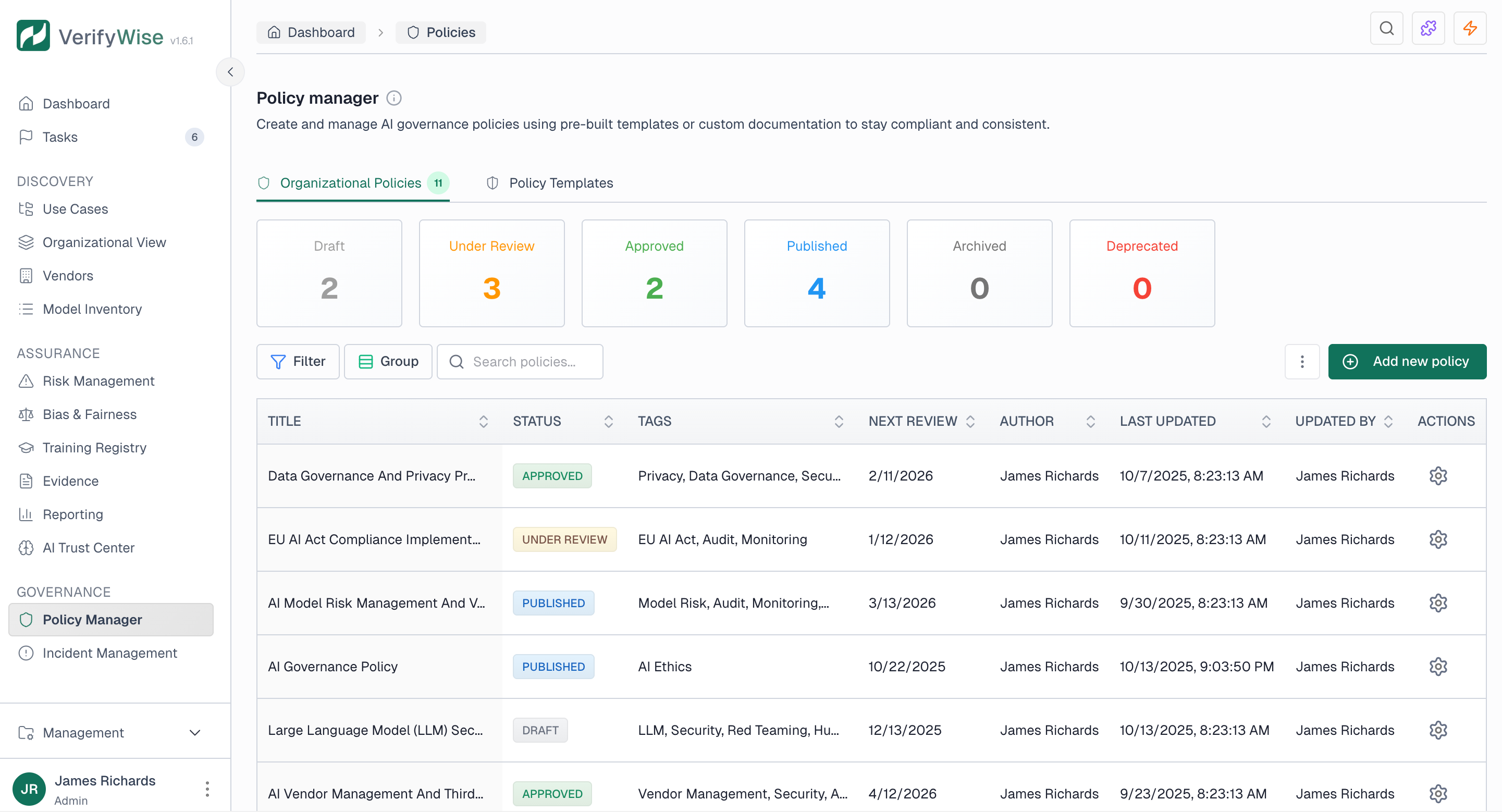
The policy manager has two tabs for organizing your work:
Organizational policies
Your organization's custom policies. Create, edit, and manage policies that define your AI governance standards.
Policy templates
Pre-built templates covering common AI governance topics. Use templates as starting points for your own policies.
Policy status overview
At the top of the organizational policies tab, status cards show the distribution of your policies across each lifecycle stage:
- Draft, policies being written or edited, not yet ready for review
- Under review, policies submitted for stakeholder review
- Approved, policies that have passed review and are ready for publication
- Published, active policies that apply to your organization
- Archived, older policies kept for reference but no longer active
- Deprecated, policies that have been superseded or are no longer relevant
Creating a policy
To create a new policy:
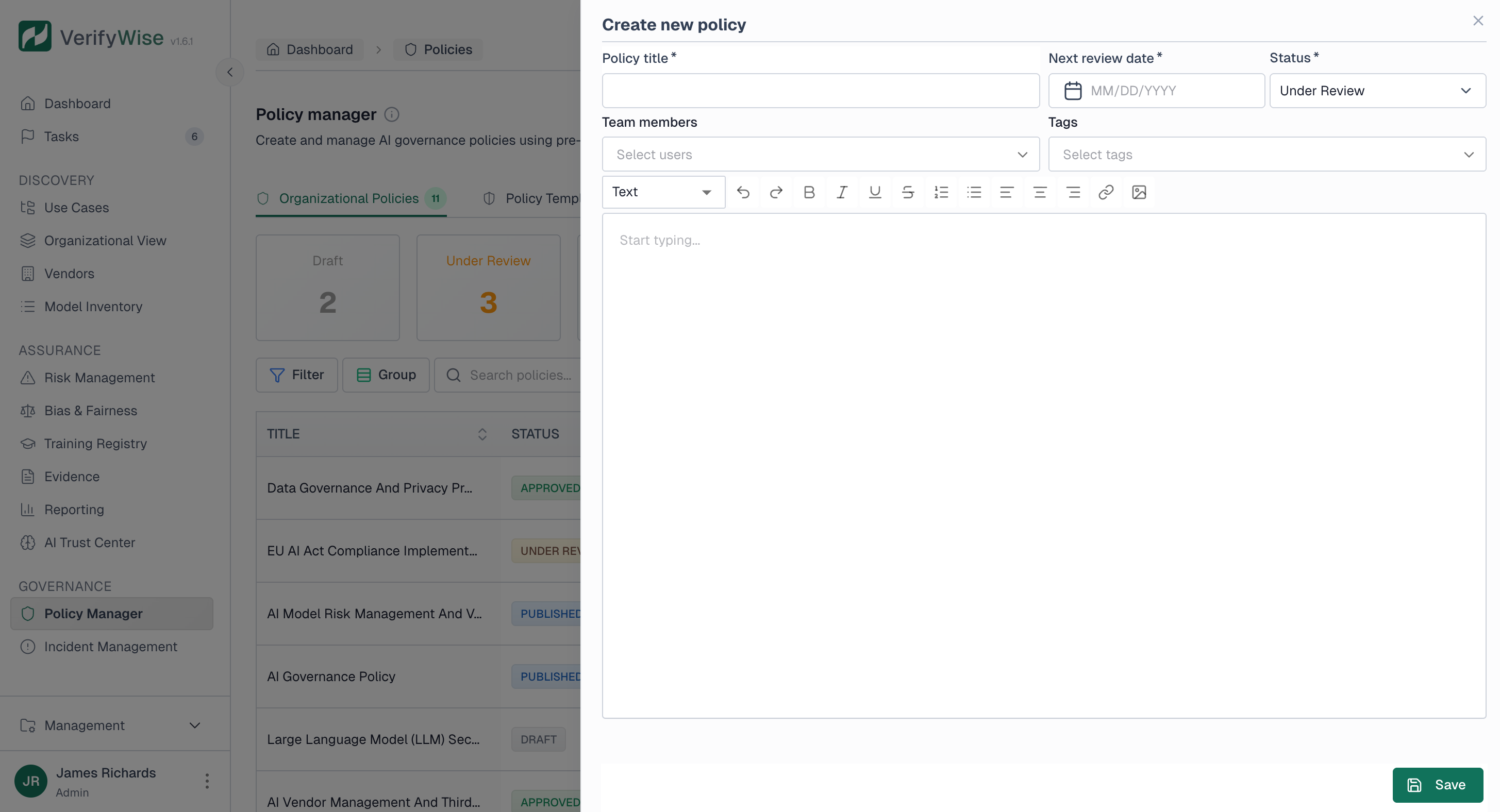
- Click "Add new policy" in the organizational policies tab
- Enter a title that clearly describes the policy's purpose
- Assign a policy owner who is accountable for the policy
- Write or paste the policy content using the rich text editor
- Select relevant tags to categorize the policy
- Set the initial status (typically Draft)
- Optionally add team members as reviewers
- Optionally set a next review date
- Save the policy
Policy fields
Each policy includes the following information:
- Title: A clear, descriptive name for the policy (up to 128 characters)
- Policy owner: The person accountable for the policy. Owners cannot also be assigned as reviewers on the same policy.
- Content: The full policy text with rich formatting support
- Status: Current lifecycle stage (Draft, Under review, Approved, Published, Archived, Deprecated)
- Tags: Categories like AI ethics, Privacy, Security, EU AI Act, ISO 42001, etc.
- Team members: Reviewers assigned to evaluate the policy. The policy owner is excluded from this list.
- Next review date: When the policy should be reviewed for updates
- Author: The person who created the policy
- Last updated: When the policy was most recently modified
- Updated by: Who made the most recent changes
Available policy tags
VerifyWise comes with predefined tags to help you categorize policies:
- Governance topics: AI ethics, Fairness, Transparency, Explainability, Bias mitigation, Accountability, Human oversight
- Technical areas: Privacy, Data governance, Model risk, Security, LLM, Red teaming, Monitoring
- Compliance frameworks: EU AI Act, ISO 42001, NIST RMF, Audit, Vendor management
Filtering and searching
There are a few ways to find specific policies:
- Filter: Filter by title, status, author, or next review date
- Group by: Group policies by status or author for easier navigation
- Search: Search for policies by title
Editing and deleting policies
To edit a policy, click on it in the table to open the detail view. Make your changes and save. The last updated timestamp and updated by fields get recorded automatically.
To delete a policy, use the delete action in the policy table. Deleted policies can't be recovered, so consider archiving instead if you might need to reference them later.
Frequently asked questions
Can we use our existing corporate policies?
Yes. You can paste existing policy content into VerifyWise to centralize your AI governance documentation. Many organizations start by importing what they already have, then use VerifyWise to track status, schedule reviews and keep everything in one place.
How do AI policies relate to general corporate policies?
AI policies should complement your existing corporate policies, not replace them. Your general data protection, information security and ethics policies still apply. AI-specific policies cover things like model transparency, algorithmic fairness and automated decision-making. Reference your corporate policies where they apply and focus AI policies on what's actually different about AI.
How many policies do we need?
Start with the policies your regulatory environment requires and add others based on your risk assessment. Most organizations need at least an AI ethics policy, a model development policy and a data governance policy for AI. Use the templates as a guide for what to cover, but don't create policies just to check a box. Each one should address a real governance need.
Who should write AI policies?
Policy development typically involves technical teams who understand the AI systems, legal and compliance teams who know the regulatory requirements and business stakeholders who understand operational needs. Assign a policy owner to draft and maintain each policy, with input from relevant subject matter experts.
How often should policies be reviewed?
At least annually, or more often for fast-moving areas. AI regulations and best practices are still evolving, so your policies may need updates more often than traditional corporate ones. Set review dates when you publish a policy and use VerifyWise to track when reviews are due.