Training registry
Track AI training programs and team competency development.
Overview
The Training registry helps you track AI-related training programs across your organization. Keeping a record of training activities shows that your team has the knowledge and skills to develop, deploy and govern AI systems responsibly.
Training records matter for compliance with AI regulations that require organizations to demonstrate staff competency. The registry gives you a central place to document what training happened, who took part and what's planned next.
Why track AI training?
AI governance takes more than policies and technical controls. People need the right knowledge and skills to put governance into practice. Tracking training helps you build and maintain those competencies.
- Compliance requirements: Many AI regulations require documented evidence of staff training on AI risks, ethics and governance
- Competency assurance: Show that teams working with AI systems have appropriate knowledge
- Audit readiness: Give auditors clear records of training activities and participation
- Gap identification: Spot where more training is needed based on roles and responsibilities
- Continuous improvement: Track training over time to keep knowledge current as AI technology changes
The training registry screen
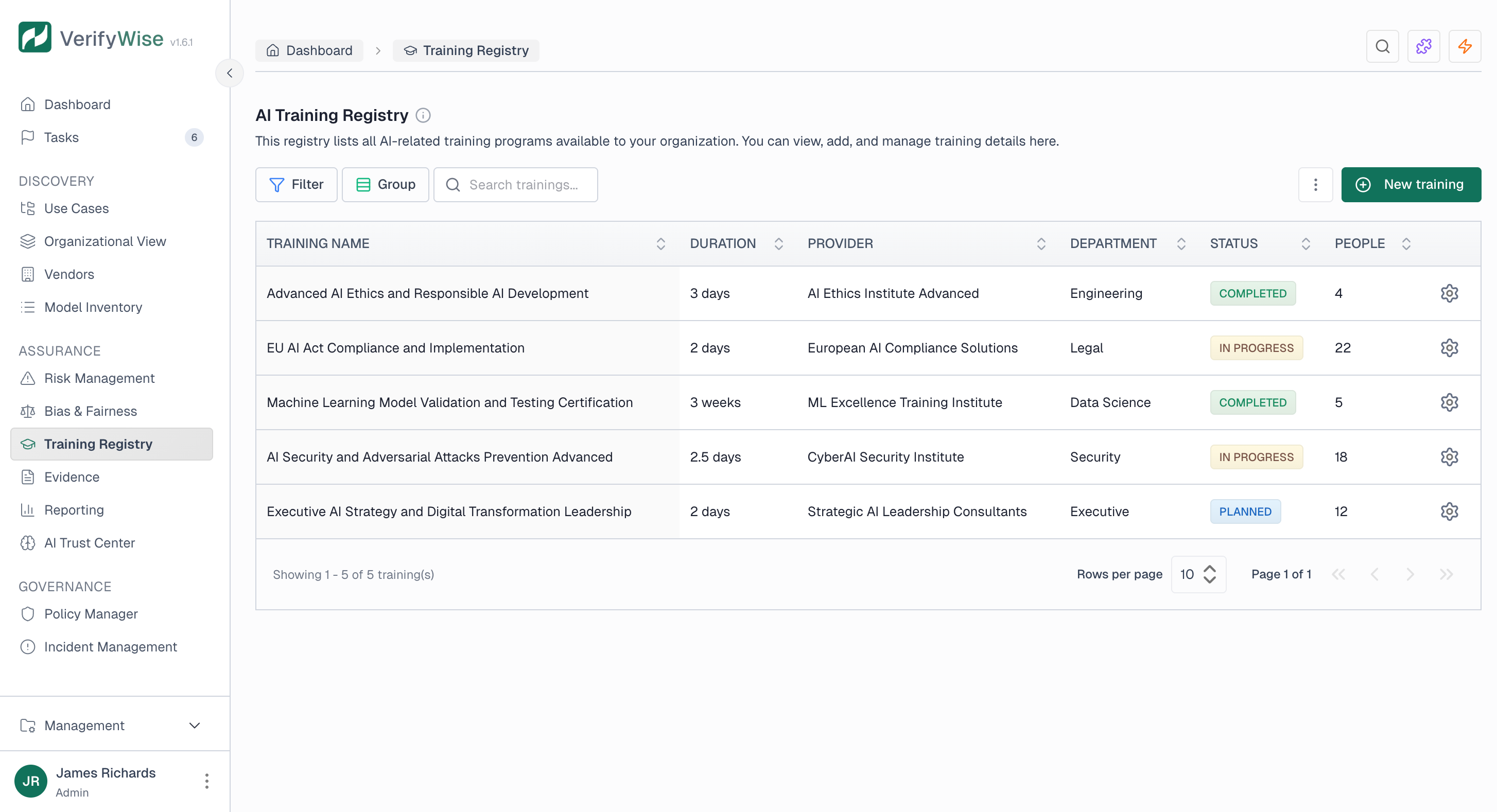
The Training registry, found under Assurance in the sidebar, shows all training programs in a table. Each row is a training program with key info visible at a glance.
The table has these columns:
- Training name: The title of the training program
- Duration: How long the training takes (in hours or days)
- Provider: Who delivers the training (internal team, external vendor, online platform)
- Department: Which department the training is for or organized by
- Status: Current state of the training (Planned, In progress, Completed)
- People: Number of participants
Training status workflow
Training programs move through a simple lifecycle:
Planned
Training is scheduled but hasn't started yet.
In progress
Training is underway. Participants are actively engaged.
Completed
Training is done. All sessions have been delivered.
Adding a training program
To add a new training program:
- Click "New training" in the toolbar
- Enter a training name that clearly describes the program
- Specify the duration
- Enter the provider (who delivers the training)
- Select the department
- Set the status (Planned, In progress or Completed)
- Enter the number of participants
- Add a description with details about content and objectives
- Save the training record
Training record fields
Each training record includes:
- Training name: A clear, descriptive title
- Duration: The length of the training (e.g., 2 hours, 1 day, 2 weeks)
- Provider: The organization or team delivering the training
- Department: The department organizing or participating in the training
- Status: Current lifecycle stage (Planned, In progress, Completed)
- Number of people: How many participants are enrolled or have completed the training
- Description: Details about content, objectives and outcomes
Filtering and searching
The training registry gives you several ways to find specific programs:
- Filter: Filter by training name, status, provider, department or duration
- Group by: Group programs by status, provider or department
- Search: Search for programs by name
Editing and deleting training records
To edit a training record, click on it in the table to open the detail view. Make your changes and save. Common updates include changing status as training moves forward or updating the participant count.
To delete a training record, use the delete action in the table. Think about whether you want to keep completed records for historical reference and audits before deleting.
Uploading training evidence
Each training record has an Evidence tab where you can attach supporting documents such as certificates, attendance records and assessment results. This gives auditors direct proof that the training actually took place and that participants completed it.
To upload evidence:
- Open a training record and switch to the Evidence tab
- Click "Upload evidence"
- Enter an evidence name that identifies the document
- Choose an evidence type (see the list below)
- Optionally add a description with notes about the evidence
- Optionally set an expiry date for time-sensitive evidence such as certifications
- Drag and drop files into the upload area, or click to browse
- Save the evidence
Evidence types
- Training certificate: A formal certificate of completion issued by the training provider
- Attendance record: A sign-in sheet, register or other proof that participants attended
- Course completion: A summary report confirming the course was finished
- Assessment result: Test or quiz results showing participants met the required level
- Other: Any other supporting documentation that does not fit the categories above
You can upload multiple files per evidence record. Use "Add more files" to attach additional documents, or remove individual files before saving. To remove or replace evidence later, open the training record and use the delete action next to each evidence entry.
Common AI training topics
Organizations typically track training across several AI-related areas:
- AI fundamentals and concepts for non-technical staff
- AI ethics and responsible AI development
- AI risk management and assessment
- Regulatory compliance (EU AI Act, ISO 42001, etc.)
- Bias detection and mitigation techniques
- AI security and privacy considerations
- Model development and testing best practices
- AI incident response and escalation
- Human oversight of AI systems
- AI transparency and explainability
Best practices
- Document all AI training: Record both formal programs and informal learning related to AI governance
- Track by role: Make sure training fits different roles (developers, managers, compliance staff)
- Update status promptly: Keep training status current so the registry reflects reality
- Include external training: Record training from external providers and conferences, not just internal programs
- Link to compliance: Note which programs satisfy specific regulatory or framework requirements
- Plan ahead: Use Planned status to schedule future training and keep development going
Frequently asked questions
What training is required for AI compliance?
It depends on the regulation and your organization's AI activities. The EU AI Act requires providers of high-risk AI systems to make sure staff have sufficient AI literacy. ISO 42001 requires organizations to determine the competence needed for roles affecting AI management. Start by identifying which regulations apply to you, then figure out what training your teams need.
How often should AI training be refreshed?
AI technology and regulations move fast, so training should be refreshed more often than typical corporate training. Annual refreshers for core topics is a good baseline, with extra sessions when major regulatory changes happen or new AI technologies are adopted. Use the registry to track when refreshers are due.
Who needs AI training?
Anyone involved in developing, deploying, using or governing AI systems should get appropriate training. That includes data scientists and engineers, product managers, compliance and legal staff and executives making AI governance decisions. Tailor the content to each role's responsibilities.
How do we demonstrate training compliance to auditors?
The training registry gives auditors what they need. Share the registry to show what training was completed, who took part and when. Keep training materials and attendance records as backup evidence. The registry works as a summary with details available on request.
Should we track external training and certifications?
Yes. External training, conferences, certifications and self-directed learning all build your organization's AI competency. Record them in the registry with the provider field showing the external source. This gives a complete picture of your team's AI knowledge.